

Show, hide, and resize Dabble's panels
The panels around your page are there when you need them and in the way when you don’t. Naming a chapter? You want the navigation panel. Chasing a sentence across a hard scene? You want the page and nothing else.
Dabble lets you clear the room to taste, one panel at a time, and set the sidebars to the width that suits you.
Open View Options
Section titled “Open View Options”Every panel toggle lives in one place.
- In the header, click the View Options icon (the eye).
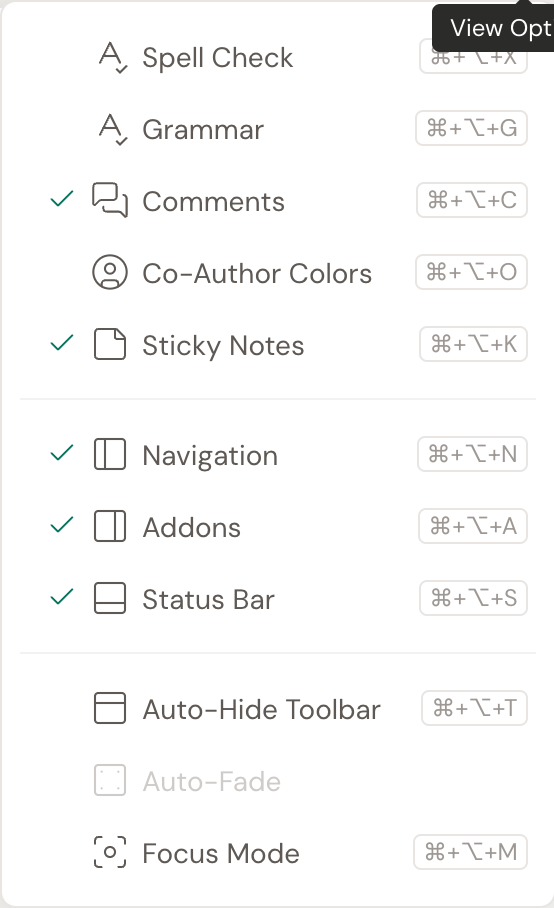
- The menu lists what you can show or hide. A checkmark means it’s on.
Show or hide a panel
Section titled “Show or hide a panel”Click any item in View Options to flip it on or off. The main ones:
- Navigation shows the left sidebar with your books, chapters, and scenes. Shortcut: Cmd+Opt+N (Ctrl+Alt+N).
- Addons shows the right sidebar with your tools, like comments and notes. Shortcut: Cmd+Opt+A (Ctrl+Alt+A).
- Status Bar shows the word-count bar along the bottom. Shortcut: Cmd+Opt+S (Ctrl+Alt+S).
- Auto-Hide Toolbar tucks the formatting toolbar away until you reach for the top of the editor. Shortcut: Cmd+Opt+T (Ctrl+Alt+T).
The same menu also holds writing helpers like Spell Check, Grammar, Comments, and Sticky Notes. Toggling a panel here never touches your writing. It just changes what’s on screen.
Resize a sidebar
Section titled “Resize a sidebar”Both sidebars drag to the width you want.
- Hover the inner edge of the Navigation panel or the Addons panel until the cursor turns into a resize arrow.
- Drag left or right to set the width, then let go.
Give your outline room to breathe, or shrink a sidebar to hand more of the screen to the page.
Clear everything at once
Section titled “Clear everything at once”Want the whole workspace gone in one move? Turn on Focus Mode (Cmd+Opt+M, or Ctrl+Alt+M). It hides the panels, header, and chrome all at once, leaving just you and the page. Press Esc to bring it all back.
For the full rundown, see Focus features.