

Contact support and report a bug
Something glitched. Or a question’s been rattling around your head for the last hour. Either way, help is one click away, and you never have to leave your manuscript to find it.
This guide shows you where support lives inside Dabble, and how to write a bug report the team can actually act on.
Before you begin
Section titled “Before you begin”Support, bug reports, and feature requests all start in the same spot: the Help menu at the top of the app. No separate email address to dig up, no phone number.
Locked out, or can’t open the app at all? Email the team straight at support@dabblewriter.com.
Contact support from inside Dabble
Section titled “Contact support from inside Dabble”Here’s the whole path, start to finish.
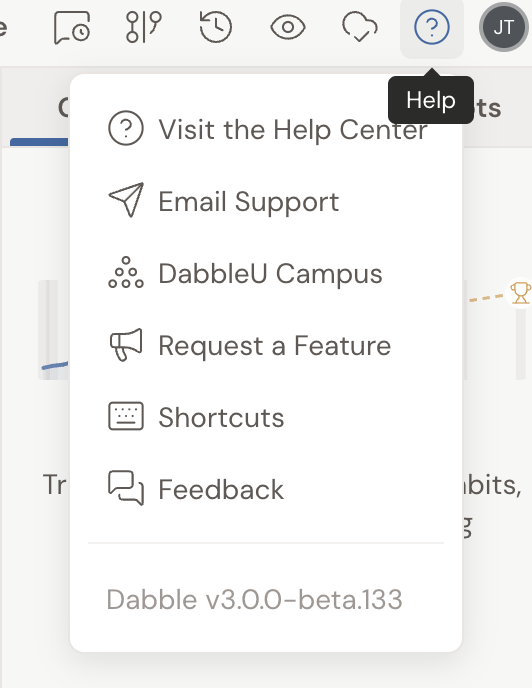
- In the top bar of the app, click the Help button (the question-mark icon).
- In the menu that opens, choose Email Support. That starts a message to support@dabblewriter.com.
- Describe what happened and send it. The team replies by email.
The same menu also has Visit the Help Center (these articles), DabbleU Campus, Request a Feature, Shortcuts, and Feedback. Your Dabble version number sits at the bottom, which is worth including in a bug report.
Chat with us from the Help Center
Section titled “Chat with us from the Help Center”If an article here didn’t answer your question, you don’t have to go anywhere else. Click the chat button in the bottom corner of any Help Center page and send the team a message. If nobody’s available right that moment, you’ll get a reply by email.
Report a bug
Section titled “Report a bug”A bug the team can reproduce is a bug the team can fix. So give them enough to walk in your footsteps.
Start a chat from any Help Center page (or email support@dabblewriter.com) and include:
- What happened, and what you expected to happen instead.
- The steps to get there, so the team can follow the same path.
- Where you were: which project, and which part of Dabble (manuscript, plot grid, notes, and so on).
- Your device and browser: for example, Chrome on Windows, Safari on Mac, or the desktop or mobile app.
- A screenshot, if you can capture one. It often says more than a paragraph.
The more specific you are, the faster the team can find and fix the problem.
Request a feature
Section titled “Request a feature”Got an idea for Dabble? See Request a feature for Dabble.
- Want to talk with other writers? The Help menu also has DabbleU Campus, Dabble’s community of authors.
- Looking for keyboard shortcuts? Choose Shortcuts from the same menu to see the full list.
- Can’t reach Dabble at all? If the dashboard shows Can’t reach Dabble or You’re offline, your work is safe on the server. See the related article below before you report it as a bug.