

Can I use Dabble for non-fiction?
Yes. You can write your non-fiction book in Dabble.
Here’s the worry, though. Every menu says Scenes and Chapters and Manuscripts. You’re writing a memoir, not a murder mystery, and the whole app seems to assume there’s a villain hiding somewhere.
There isn’t. And nothing in Dabble makes you invent one. This doc shows how the fiction-flavored structure maps onto non-fiction, and where you might do a little extra shaping.
What “built for fiction” really means
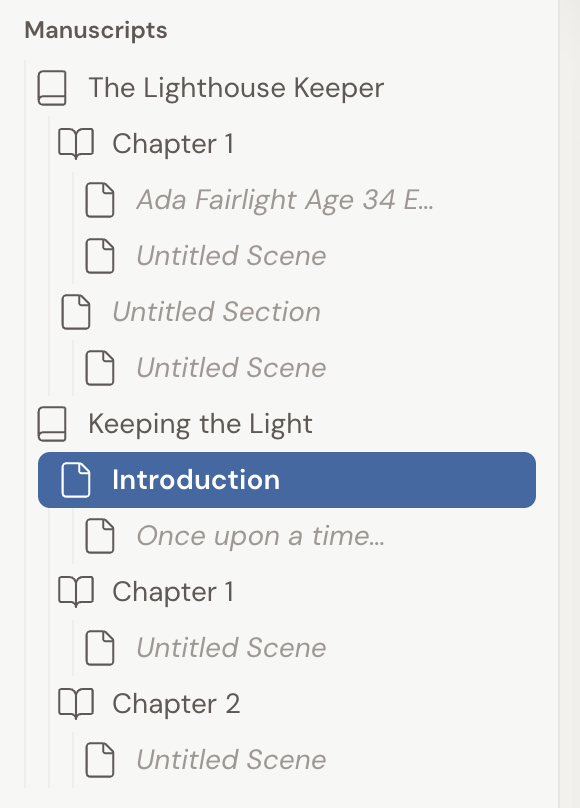
Section titled “What “built for fiction” really means”Dabble’s language leans hard into storytelling. Your project lives in a section called Manuscripts. Your writing splits into Books, Parts, Chapters, and Scenes.
Those are novel words. But the structure under them is just a flexible outline: a book made of chapters, and chapters made of smaller pieces of prose.
Nothing forces that outline to hold a story. A Scene is simply the place your words go. A tense confrontation, a step-by-step explanation of compound interest: Dabble treats them exactly the same.
How well it fits depends on your kind of non-fiction
Section titled “How well it fits depends on your kind of non-fiction”Narrative non-fiction is the easy case. Memoir, biography, autobiography, narrative history: the kind that reads like a story. It all flows chapter by chapter, scene by scene, just like a novel. Write one of those and you’ll rarely notice Dabble had fiction in mind.
More structured, expository non-fiction works too. A textbook, a business book, a self-help guide: they’ll just ask a little extra shaping from you.
Heavy tables, footnotes, and complex reference formatting aren’t Dabble’s focus. Some of that fine-tuning may wait until you export to your publishing tool of choice.
Structuring a non-fiction book
Section titled “Structuring a non-fiction book”The building blocks novelists use map cleanly onto non-fiction.
Group related chapters under a Part when your book has distinct sections (say, “Before the War” and “After the War” in a biography).
Reach for a Section instead of a numbered Chapter for front and back matter: an introduction, a preface, an appendix. A Section is unnumbered, so it won’t disrupt your “Chapter 1, Chapter 2” count, and you can even hide its title.
Each Chapter holds one or more Scenes, and the Scenes are where you actually write. Split a long Scene in two, or merge two into one, as your draft takes shape.
Keeping research and outlines close
Section titled “Keeping research and outlines close”Non-fiction lives or dies on its research. Dabble gives that research a home right beside your draft.
Use Story Notes to hold your outlines, sources, interview transcripts, timelines, and any reference material you want close. Despite the name, Story Notes are just a flexible note system. They work as well for a researched argument as for a cast of characters.
Where Dabble is headed
Section titled “Where Dabble is headed”Fiction is still Dabble’s main focus today, and we keep expanding what the app can do for every kind of writing.
If a feature you need for non-fiction isn’t here yet, your work stays safe and portable. You can always export your manuscript to Word or another format and finish any specialized formatting there.