

Look up synonyms with the Thesaurus
You’ve written “beautiful” four times on one page, and your brain has quietly stopped offering alternatives. It happens to everyone.
Dabble’s Thesaurus finds you another word without sending you off to a browser tab, where a quick synonym check somehow becomes forty minutes reading about the etymology of “gloaming.” Look up a word, pick a better one, keep writing.
Open the Thesaurus
Section titled “Open the Thesaurus”- Open a manuscript document so the editor is showing.
- Click the Thesaurus button in the document toolbar, or press Cmd+Option+H (Mac) or Ctrl+Alt+H (Windows). The same button and shortcut close it again.
- Select the word you want to replace, or click into it.
- The Thesaurus panel lists synonyms. Click one to drop it into your manuscript in place of the original word.
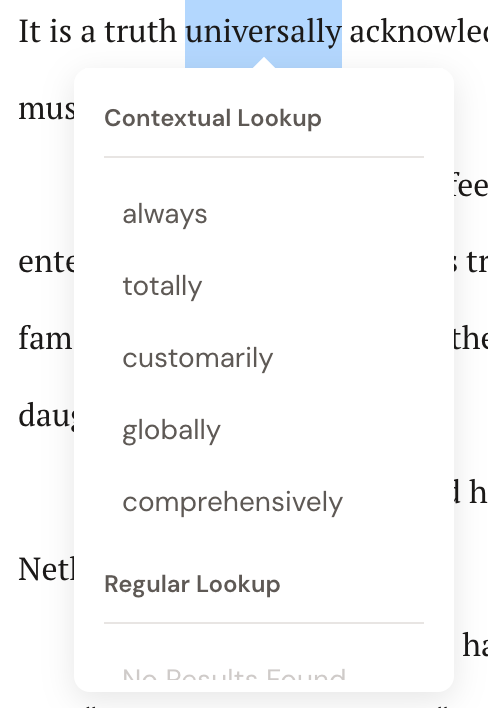
Contextual and regular lookups
Section titled “Contextual and regular lookups”The Thesaurus searches two ways.
- Contextual lookup reads the sentence around your word and suggests synonyms that fit that particular use. Reach for it when a word carries several meanings and you want the right shade of it.
- Regular lookup ignores the sentence and lists synonyms for the word on its own. Reach for it when you just want a fast, plain list.
If a search turns up nothing, you’ll see No Results Found. Try the base form of the word rather than a rare inflection.
Language support
Section titled “Language support”The Thesaurus works in English only. The service behind it doesn’t carry synonyms for Dabble’s other writing languages.
Set your project to another language and Dabble says so rather than leaving you to wonder:
- The Thesaurus panel reads “The thesaurus is available in English only.”
- The toolbar’s Thesaurus button says the same when you hover it.
- Choosing a non-English language in Project Settings › Spelling & Grammar shows that note under the Grammar Language dropdown, before you save.
Everything else the Grammar Language setting controls still follows your language. Spelling, grammar, and Read to Me voices all do. The Thesaurus is the one exception. See Change the checking language.
- The Thesaurus only suggests words. It never rewrites your sentence or invents prose. Which word lands on the page is always your call.
- Writing in another language and want synonyms anyway? Switching your Grammar Language to English won’t help, because there’s nothing English-language synonyms can do for a French sentence. It will only turn off spelling and grammar checking for the language you’re actually writing in.