

Use more than one Dabble account
One email for your own novel. Another for the account you share with a co-author or your writing group. Dabble lets you stay signed in to both and hop between them in a click, no logging out required.
Each account keeps its own projects, subscription, and settings. Switching just changes which one you’re looking at.
This doc covers adding a second account and moving between the ones you’re signed in to.
Sign in to another account
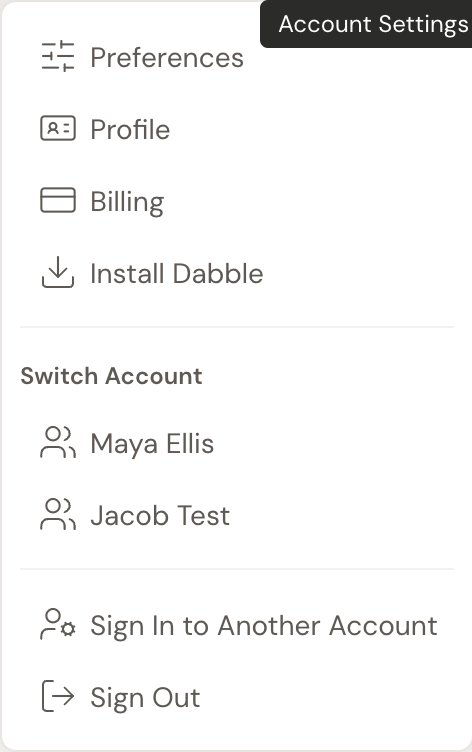
Section titled “Sign in to another account”- In the writing app, click your avatar (top right) to open the account menu.
- Choose Sign In To Another Account. Dabble opens the login page.
- Enter the email and password for the other account, then click Log in.
Dabble drops you back on the account you just signed in to. Both accounts are now active, and Dabble remembers them for next time.
Don’t have the second account yet, or blanking on its password? See Sign in and reset your password.
Switch between your accounts
Section titled “Switch between your accounts”Once you’re signed in to more than one, the account menu keeps them all on hand.
- Click your avatar (top right) to open the account menu.
- Under Switch Account, click the account you want.
- Dabble reloads on that account, with its own projects, subscription, and stats.
No signing out, no re-typing a password. You’re just swapping which account is in front of you.
Good to know
Section titled “Good to know”- Nothing crosses over. Projects, subscription, word counts, and preferences belong to one account. Switching accounts doesn’t merge them.
- A common setup: a personal account for your own writing plus a shared account your co-author or group signs into. It works, but for writing the same book together, sharing the project is usually smoother than sharing a login. See Invite a co-author.
- Signing in elsewhere. You can also add and switch accounts from your account portal at
accounts.dabblewriter.com, under Switch Account in the sidebar.