

Cancel your subscription
Maybe money’s tight. Maybe the book is finished. Whatever the reason, cancelling should be quick, and it shouldn’t cost you a single word.
It doesn’t. You can cancel anytime from your billing portal, and your access stays active until the end of the period you’ve already paid for.
Below: how to cancel, and how to undo it the moment you change your mind.
Before you cancel
Section titled “Before you cancel”A few things worth knowing first:
- Cancelling is not deleting. Your projects and your account stay put. You keep full access until your paid period ends, then your account moves to a free, read-only state.
- You can undo it. Until the period actually ends, you can reverse the cancellation and keep your subscription going.
- On a trial with no card on file? You’ll see Cancel Trial instead. Dabble asks you to confirm, then the trial ends right away.
Cancel from your billing portal
Section titled “Cancel from your billing portal”It takes about a minute.
- In the writer, click your avatar in the top-right corner.
- Click Billing. This opens your billing portal at
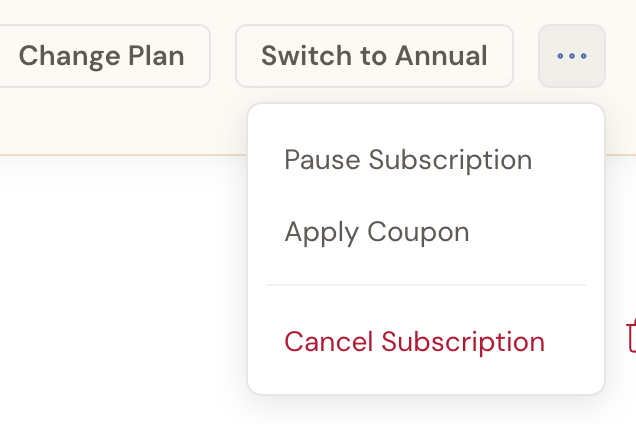
accounts.dabblewriter.com/billing/portal. - Under Current Plan, open the More Actions menu (the … button beside Change Plan) and click Cancel Subscription.
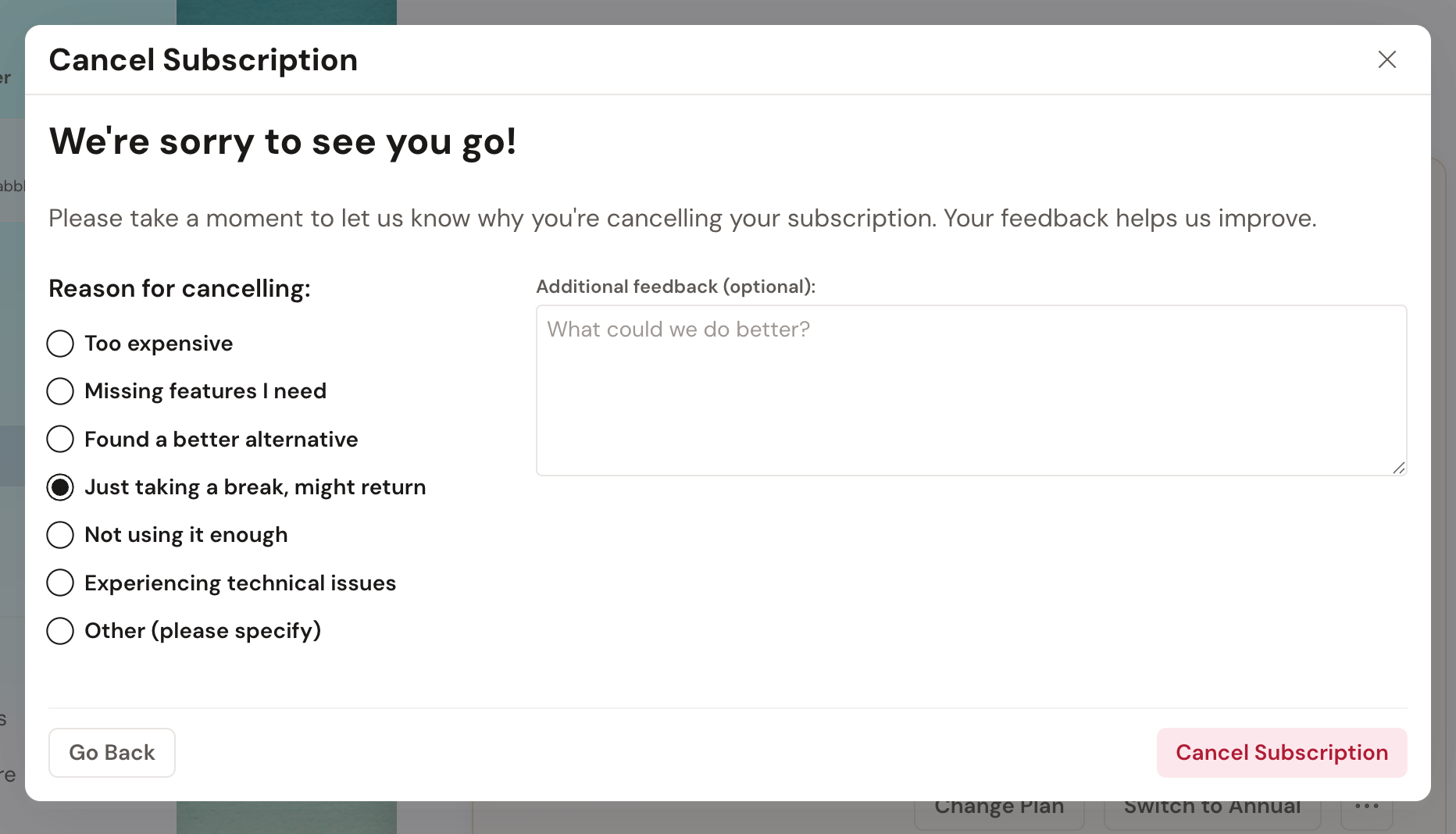
- A Cancel Subscription window opens with a short exit survey headed We’re sorry to see you go! Pick a Reason for cancelling.
- Click Cancel Subscription to confirm. (Choose Go Back if you change your mind.)
That’s it. Your plan now shows Cancels at the end of the period, and you keep full access until that date.
Offers you might see
Section titled “Offers you might see”Dabble might try to talk you out of it. Your reason decides which offer shows up.
Choose Too expensive and you’ll get a nudge: Wait, would 50% off for 3 months help? Take it with Yes! Give me 50% off, and the discount lands on your next invoices instead of a cancellation.
Choose Not using it enough and Dabble asks whether pausing would work better than cancelling. Pause holds your plan for 1, 2, or 3 months rather than ending it. You can still cancel from there instead.
Pausing only works on monthly plans. On a yearly plan, switch to monthly billing through Change Plan first. See Pause your subscription for the details.
Troubleshooting
Section titled “Troubleshooting”- Changed your mind? Open Billing again. A banner reads Your subscription is scheduled to cancel at the end of the period, with an Undo Cancellation button beside it. Click it any time before your paid period ends and your subscription carries on.
- Need it cancelled sooner than the period end? Cancellation normally takes effect at the end of your current billing period. Contact support if you need it handled sooner.
- Don’t see Cancel Subscription? It lives in the … menu under Current Plan, not on the panel itself. If your plan is already set to cancel, the item disappears and the Undo Cancellation banner takes its place. And a lifetime plan has nothing to cancel: yours reads Congratulations! You own Dabble for life.