

Pause your subscription
Life happens. A slow month, a dry spell, a stretch where every dollar has a job. You don’t have to cancel to take a break.
Pausing puts your subscription on hold for a month or two. The charges stop. Every project, word, and setting stays exactly where you left it. When you’re ready, you pick right back up.
Pause or cancel
Section titled “Pause or cancel”Both stop the bill. They’re not the same move.
- Pause keeps your plan. Billing goes quiet for 1, 2, or 3 months, then your subscription resumes automatically. Your plan is just waiting for you.
- Cancel ends your plan. Your subscription stops at the end of the period you’ve already paid for, and your account drops to a free, read-only state.
If you know you’ll be back, pause. If you’re done for good, see Cancel your subscription.
Pause from your billing portal
Section titled “Pause from your billing portal”It takes about a minute.
- In the writer, click your avatar in the top-right corner.
- Click Billing. This opens your billing portal at
accounts.dabblewriter.com/billing/portal. - In the Current Plan panel, click the More Actions button (the one with three dots), then click Pause Subscription.
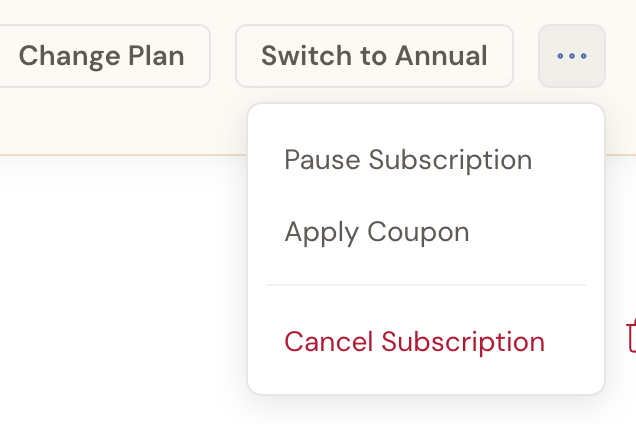
- Choose how long: 1 Month, 2 Months, or 3 Months.
- Click Pause Subscription to confirm.
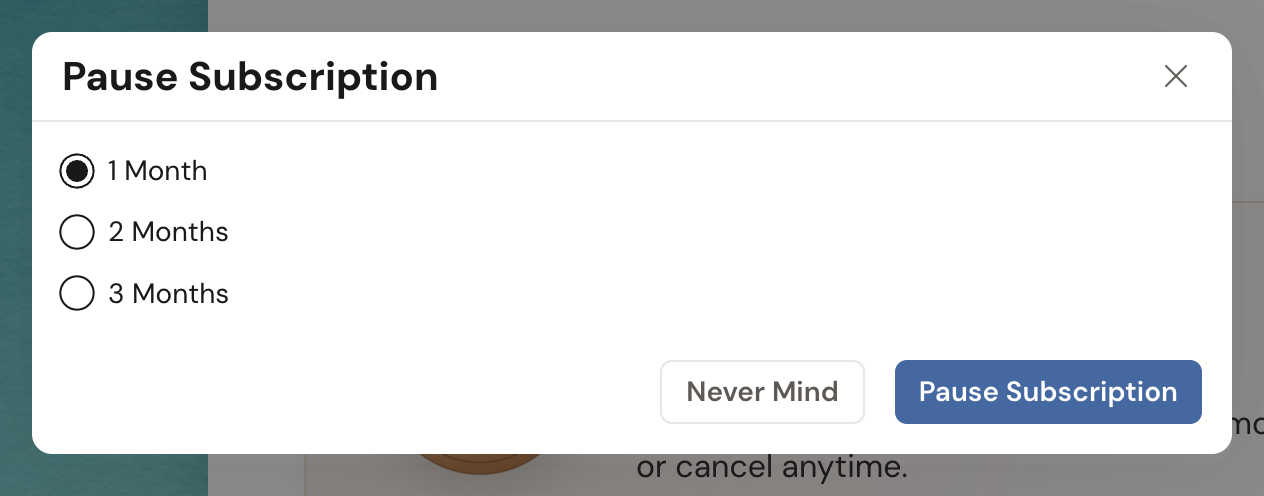
The modal flips to a Subscription paused confirmation with your resume date on it. Click Close and you’re done.
Your plan now reads Paused, resumes in about 1 month, and you won’t be charged again until that date arrives.
Starting from the cancellation survey instead? Pick Not using it enough and the same 1, 2, and 3 month options appear right there, with a Cancel Subscription Instead choice underneath if pausing isn’t what you need. That path is covered in Cancel your subscription.
On an annual plan? Pause Subscription is greyed out in the menu. Switch to monthly billing first through Change Plan, then pause.
While you’re paused
Section titled “While you’re paused”- No charges. Billing stops until your resume date, then picks back up on its own.
- Paid features go quiet. Your account sits at the free level for the length of the pause, so subscription features are on hold.
- Your work is safe. Projects, scenes, notes, and edit history all stay put. Nothing is deleted, and your plan tier is unchanged underneath.
Resume your subscription
Section titled “Resume your subscription”Here’s the one thing to know before you pause: you can’t resume on your own for the first 30 days.
While you’re paused, the Current Plan panel carries a status badge reading Paused, resumes in about 1 month. It always counts the time left in your break rather than naming a calendar date.
The Resume Subscription button sits in that same panel. Every pause sets a 30-day lock, and until it lifts, the button is greyed out. Hover it and a tooltip names the date you’re free to use it.
On a one-month pause, that lock covers nearly the whole break, so billing usually just restarts on its own before you’d ever need the button.
Need to come back sooner than the date on the tooltip? Contact support and we’ll lift it for you.
Once the lock is off:
- In the writer, click your avatar, then click Billing.
- Under Current Plan, click Resume Subscription.
Your subscription picks back up and billing continues as normal.