

Format letters and poems
You drop a poem into your manuscript and it just sits there. Flush left, same as every other paragraph. A letter blends right into the prose around it. Close, but not quite right.
Dabble has two blockquote styles built for exactly this. One centers and italicizes your text, made for poetry and song lyrics. The other indents it, for letters and block quotes.
Both are one click away. Here’s where they live and how to reach them.
Before you begin
Section titled “Before you begin”Both styles live in the Formatting Toolbar, which is hidden until you show it.
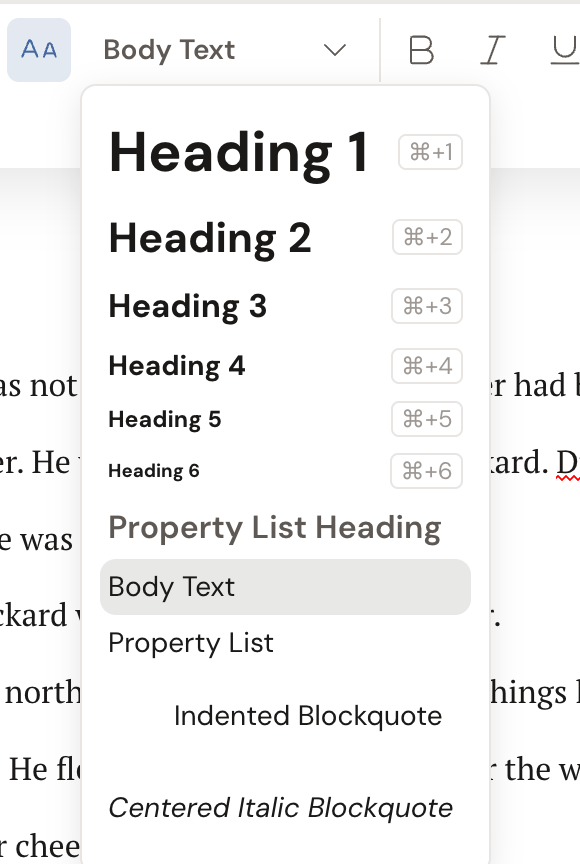
You reach them from the block-type dropdown on the left of that toolbar. The dropdown shows your current block type, which reads Body Text for a normal paragraph.
Format a poem or verse
Section titled “Format a poem or verse”This style centers your lines and sets them in italics.
- Click into the paragraph you want to style, or select several lines.
- Show the Formatting Toolbar if it isn’t already up.
- Open the block-type dropdown on the left (it reads Body Text for a normal paragraph).
- Choose Centered Italic Blockquote.
Format a letter or block quote
Section titled “Format a letter or block quote”This style indents the passage, so a letter or a quoted excerpt stands apart from your prose.
- Click into the paragraph, or select the lines you want.
- Open the block-type dropdown in the Formatting Toolbar.
- Choose Indented Blockquote.
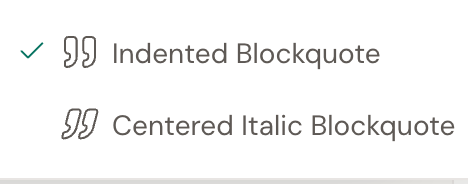
There’s a quicker route to either style: the blockquote split-button in the Formatting Toolbar. Click the caret beside it to pick Indented Blockquote or Centered Italic Blockquote. Clicking the active style again turns it off and returns the text to Body Text.
Tips for poems and letters
Section titled “Tips for poems and letters”- Keep lines together in a poem. Press Shift+Enter to start a new line within the same stanza without beginning a new paragraph. A normal Enter starts a fresh paragraph, which adds spacing between lines.
- Type your way there. Type
>at the start of a line to turn it into a blockquote as you write. - Switch styles anytime. Changing the block type replaces the previous one, so you can move a passage from Indented Blockquote to Centered Italic Blockquote in one click.