

Plans and pricing
Dabble is a subscription. One subscription, and your manuscript follows you everywhere, on web, desktop, and mobile, backed up in the cloud and always editable.
Prices and plan names live in your billing portal, not in this article. The portal is the current source of truth; this page just explains how the pieces fit together.
Your plan and price come from your billing portal at accounts.dabblewriter.com/billing/portal. Open it from the avatar menu in the writer.
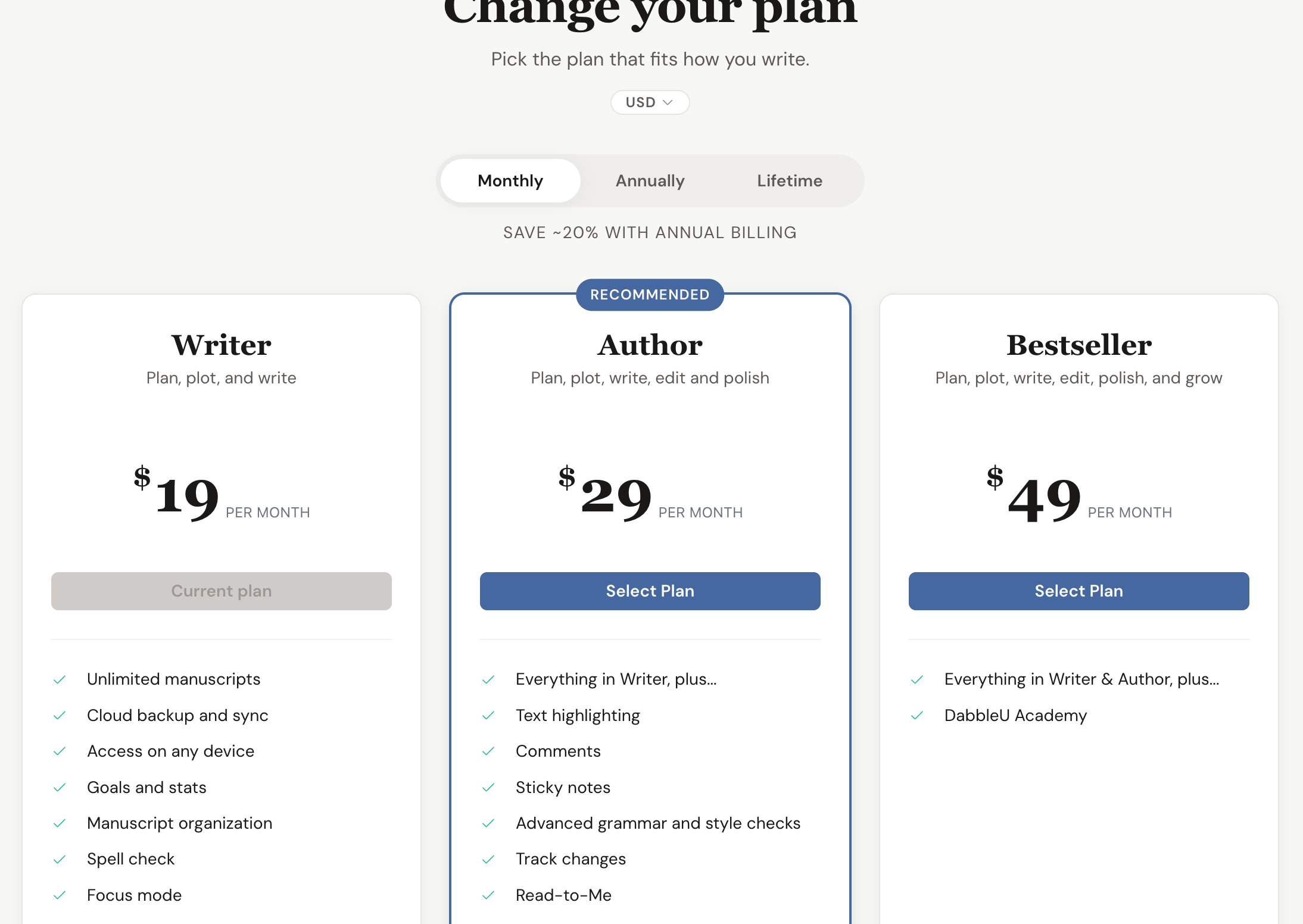
Dabble lays its plans out on one grid so you can size them up side by side.
The grid groups plans by product, sorts them by price, badges the recommended one, and toggles between Monthly, Annually, and Lifetime. Names, descriptions, and prices come straight from Dabble’s billing system, so the grid always shows current pricing.
| Plan | Notes |
|---|---|
| Writer | Entry plan. |
| Author | The middle plan, and the one that carries the recommended badge. |
| Bestseller | Top plan. |
Subscribed years ago? You may be on Writer+, a legacy plan Dabble no longer sells. It replaced the old Basic and Standard plans. Old Premium plans became Bestseller.
Billing intervals
Section titled “Billing intervals”Pay the way that suits you. You can change your mind later.
You can pay Monthly or Annually, and switch between them at any time. Annual billing costs less over the year.
| Interval | Notes |
|---|---|
| Monthly | Billed every month. |
| Annually | Billed once a year. The grid note reads Save ~20% with annual billing. |
| Lifetime | Pay once. No renewal. |
On a monthly plan? The portal shows a Switch to Annual shortcut, with the note “Save money by switching to an annual plan.” It jumps straight to checkout with the annual plan preselected.
Currencies
Section titled “Currencies”Dabble prices its plans in six currencies: US Dollar (USD), Euro (EUR), British Pound (GBP), Canadian Dollar (CAD), Australian Dollar (AUD), and New Zealand Dollar (NZD).
The plans grid has a currency pill above the interval toggle. It starts on the currency your subscription is billed in, or, if you don’t have one yet, the currency for your country.
Already subscribed and want to move to a different currency? That one has money consequences. See Change your billing currency.
Free trial
Section titled “Free trial”New here? You get two weeks to write before anything is due.
New accounts that sign up directly (not invited as a collaborator) start with a 14 day free trial. During the trial you can write, sync, and use Dabble’s features with no payment up front. The portal shows your remaining time as Trial ends {date} or Trialing {plan}, ends {date}.
To keep writing after the trial, add a subscription before it ends. To stop, use Cancel Trial, which cancels immediately.
What plans include
Section titled “What plans include”Every plan card lists the features it includes.
For the full list, plan by plan, including the legacy Writer+ plan, see What features do I get in Dabble?
Collaborators per project
Section titled “Collaborators per project”Every project has a ceiling on how many people can be on it. Your plan sets that ceiling.
The cap belongs to the person who owns the project, not to the people they invite. The owner doesn’t count toward it. Pending invitations do, from the moment you send them.
| Plan | Collaborators per project |
|---|---|
| Writer and Writer+ | 5 |
| Author, Bestseller, and lifetime plans | 100 |
| No active plan | 0 |
The Share dialog keeps count for you. It shows the tally next to the invite box and above People with Access, as a plain “3/5”, with the full “3 of 5 people” on hover.
Reach for one more than your plan allows and Dabble stops you: “You’ve reached the sharing limit of 5 people.”
With no active plan, sharing is off entirely. The Share dialog says “Sharing isn’t available on your current plan. Upgrade to invite collaborators.” and offers an Upgrade button.
A shared branch gets its own cap, the same size as your project’s.
Coupons and referrals
Section titled “Coupons and referrals”Got a code? Here’s where it lands.
Once you have a billing account, you can apply a coupon code to your subscription from the portal. Referral codes give a $20 discount, and they only work on new accounts at signup, not on an existing subscription. Only one percent-off coupon can be active at a time.
What your subscription does not pay for
Section titled “What your subscription does not pay for”Dabble is AI-free, and that is a deliberate choice. Your subscription pays for the writing tools, sync, and backup that help you tell your story, not for generative AI writing features.
The one exception is the text-to-speech voices that power Read to Me.